

Build a playable multiplayer game as a Paper server plugin in Java. Ship it, get a Raspberry Pi to host it forever.
Bring to life addictive multiplayer games that you can enjoy with your friends, strangers, and the world. Experience the feeling of running a server, starting with your first plugin.
Write a Paper plugin in Java that creates a playable minigame. Follow our guide to get set up.
Use Hackatime in IntelliJ, or your editor of choice. It runs in the background — just code.
Launch your plugin live on a server. Open source and publish it, then let people play.

Hit a tier milestone, and we ship you a Raspberry Pi to take your server home and run it forever.
 Live URL
Your own Pterodactyl panel, so your plugin is accessible to anyone by your server's public IP. Unlocked after 5 tracked hours and a functioning demo.
 Open Source
Source code on GitHub with a README explaining how to set up and configure your plugin.
 Published
Plugin jar published on Hangar where anyone can download, install, and play your game on their server.
/join and /leave commandsNever made a Paper plugin before? Follow these steps and you'll have a working minigame in no time.
Paper 1.21+ requires Java 21. Download and install Eclipse Temurin JDK 21 for your platform. After installing, verify it works:
$ java -version
openjdk version "21.0.10" 2026-01-21
OpenJDK Runtime Environment Temurin-21.0.10+7
OpenJDK 64-Bit Server VM Temurin-21.0.10+7 (build 21.0.10+7, mixed mode)
Download IntelliJ IDEA Community Edition (free). Once installed, go to Plugins and install two things:
As a student you can apply for the JetBrains student pack — but for Paper plugins you won't get much out of it. Ultimate's extras are web frameworks, databases, and cloud tools that you're not likely to notice with most plugins.
In IntelliJ: New Project → Minecraft. Choose JDK 21, pick a name for your plugin, select Paper as the platform, and select the latest 1.21 Minecraft version. Enable Git. Click Create.
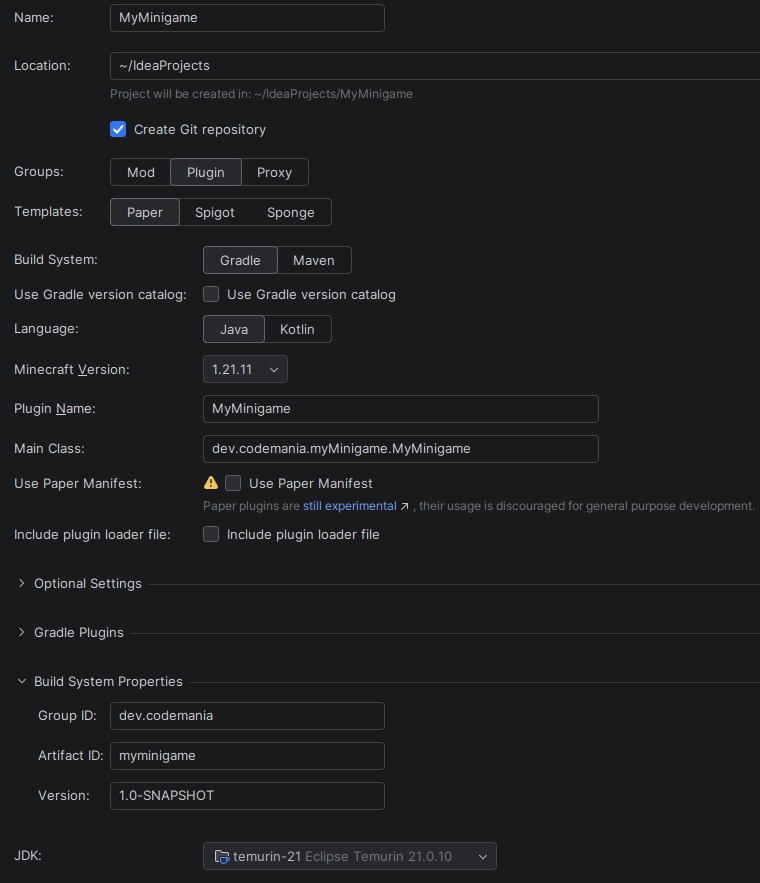
You now have a working Paper plugin project with the correct dependencies, a main class, and a plugin.yml. The Minecraft Development plugin handles all the Gradle setup for you.
Run your local server from IntelliJ once.

You'll get a EULA warning — this is normal.

Open run/eula.txt and set eula=true.
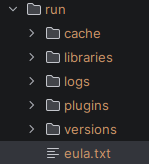
Run again. You now have a local Paper server. Your plugin will be automatically rebuilt every time you restart the server. You can connect to this server by the IP localhost.
When you want to build your plugin jar separately, switch to the build task in the top right corner. Your jar will be available in build/libs/.
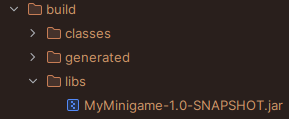
Here's the skeleton of a Paper plugin with a /join command to get you started:
package dev.codemania.myMinigame;

import java.util.Objects;

import org.bukkit.command.Command;
import org.bukkit.command.CommandExecutor;
import org.bukkit.command.CommandSender;
import org.bukkit.entity.Player;
import org.bukkit.plugin.java.JavaPlugin;
import org.jspecify.annotations.NullMarked;

@NullMarked
public class MyMinigame extends JavaPlugin implements CommandExecutor {

    @Override
    public void onEnable() {
        Objects.requireNonNull(getCommand("join")).setExecutor(this);
    }

    @Override
    public boolean onCommand(CommandSender sender, Command cmd,
                             String label, String[] args) {
        if (!(sender instanceof Player player)) { // means the sender is the server console
            sender.sendMessage("Only players can use this command.");
            return true;
        }
        player.sendMessage("You joined the game!");
        // here your game logic could go. tp to the arena, give the player their kit, etc.
        return true;
    }
}
Register the command in your plugin.yml:
name: MyMinigame
version: '${version}'

main: dev.codemania.myMinigame.MyMinigame
api-version: '1.21.11'
load: POSTWORLD

commands:
  join:
    description: Join the minigame
From here, check the Paper documentation for events, schedulers, config files, and everything else you need to build your game.
Now that we're done with the boilerplate, it's time to get implementing. Spend a couple minutes brainstorming (or not, it can be boring, I know) to figure out what you want your game to be.
KitPvP, Spleef, TNT Run, Parkour but with fancy abilities are all some ideas you can implement in a few hours.
If you're up for a not-so-mini-game, some ideas could be a Bedwars or Hunger Games clone with your own spice to it.
Let your imagination run wild — make something that pulls you to keep working on it. Most of all, make it yours. Implement the tiered requirements, submit, get your Pi, and hopefully, you can use it to launch your own server network, all based off your plugin.
Ship itOnce your plugin is demo-able, and you've got at least 5 hours tracked on Hackatime:
I'll join your server, play your game and review your code against the criteria.